





Navigating AI in Education
The use of artificial intelligence continues to expand in higher education and beyond, and students are learning how to navigate it in their personal lives, academic work, and future careers. With many perspectives, ideas, and considerations surrounding the topic, how can educators best prepare students as emerging technologies change the workforce landscape?
""
What's On This Page?
Increased AI Use by Students
90% of higher education students use AI in class at least occasionally (Instructure, 2026).
Entry-level jobs require AI skills
More than one-third (35%) of entry-level job postings require AI skills, nearly tripled in six months (NACE, 2026).
AI Overview

Artificial Intelligence (AI) refers to technology that looks like human intelligence, but operates through complex algorithms and data processing. While the technology has been present in some capacity for decades, recent advances in AI have ushered in a new age of technology that affects not only education but also the evolving landscape of the workforce for years to come.
It is important to review the Division of Information Technology's Guidelines for the Use of Artificial Intelligence (AI) Tools prior to using, or encouraging student use of, AI in the classroom.
For training resources on various AI tools and how they can be implemented in teaching and learning, faculty are encouraged to review:
- The Center for Teaching, Learning, & Scholarship's Recordings Page for previous AI-related faculty development sessions
- The Division of Information Technology's Workshops and Guides on AI Tools
AI Frameworks and Terminology
This taxonomy illustrates the hierarchical relationships between AI categories.
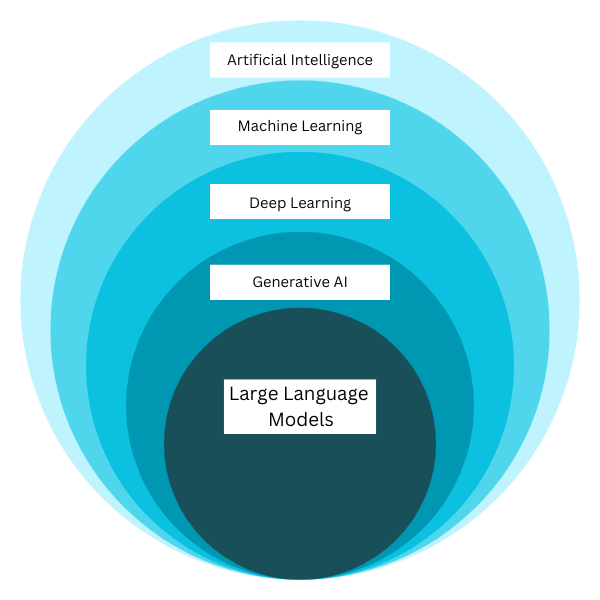
Select the image to read "AI in a Nutshell: A Practical Guide to Key Terminology" by Tobias Zwingmann.
-
Commonly Used Terms
-
Machine Learning
Machine Learning (ML) is a subset of AI where computers use algorithms to recognize patterns from data and apply that learning to other problems and complex tasks. Machine learning continuously learns and improves from its past experiences so that a programmer does not have to constantly apply a new “rule” (i.e. code) every time a problem needs to be solved. Machine learning is a method to which other types of AI function and/or produce content/data—it is the how of the following two terms. Here’s a short video on how Machine Learning works.
-
Deep Learning
Deep Learning (DL) is an advanced technique of Machine Learning that uses artificial neural networks—layers of algorithms and computing units—modeled after the human brain to mimic the learning process of humans. Deep learning is better suited for large, complex processing that involves unstructured data.
-
Generative AI
Generative AI is a broad subset of AI—under Narrow AI—that uses machine learning techniques to create new content such as text, images, audio, codes, videos, or entire applications. Generative AI platforms are trained through large datasets to predict and generate content based on patterns that it observes in the training data it receives.
Examples of Generative AI include Copilot (Microsoft, institutionally supported), ChatGPT, DALL-E, and Gemini.
-
Large Language Models
A Large Language Model (LLM) is a specific form of Generative AI that creates human-like text. As with other models that are developed with Generative AI, LLMs are trained using Machine Learning to recognize patterns and relationships from a dataset to produce text generation, language translation, text completion, and more.
-
AI Term Glossary
Keeping up with the ever-evolving terminology in AI can be challenging. AIPRM offers a comprehensive glossary of Generative AI terms to help you stay informed.
-
TXST AI Tools
Log in to Google and Microsoft products through your TXST email address (ex: abc123@txstate.edu) for access to special features. Note: Use your NetID email address to log in to your account. Using alias email addresses (ex: boko@txstate.edu) is the most common cause of login failure.
Guiding Student Use of AI
Critical evaluation of AI use in your unique teaching contexts, and in regard to courses' learning outcomes, can help determine its place in your practice. AI holds significant potential for enhancing educational experiences, but you may find that it is not always the best fit for your particular class or specific assignments within your course. Some subject matter might not lend itself well to AI integration.
Additionally, the limitations of AI technology, such as its inability to fully understand complex human emotions and nuances, may lead you to conclude that traditional teaching methods are more effective for your specific learning outcomes.
If you decide that AI has a place in your courses, there are a few practices to consider when teaching:
Help Ensure Academic Integrity
Academic Integrity remains a pillar of the educational experience at Texas State University. With the advancement of generative AI (genAI), concerns about academic integrity have risen. While creating assignments or assessments that are “AI-proof” is extremely difficult, there are methods and practices that faculty can engage in to ensure academic honesty, integrity, and success in their classes.
Before diving into ways to mitigate academic dishonesty, it's important to understand why students may resort to such behavior. Studies indicate that students may resort to cheating for reasons including:
- Lack of understanding regarding university policies or academic culture
- External and internal pressures to achieve “good” grades
- Self-justification habits [if others are doing it, why shouldn't I?, etc.]
- Perceived lack of value
Being aware of students' reasoning is pivotal to understanding and addressing student behavior, particularly regarding the use of AI in the classroom.
Making Integrity Relevant
Be open and clear about the role of AI in the course and students’ learning. When students recognize how learning connects to their goals, they are less likely to resort to dishonest shortcuts. Explaining why an assignment is relevant to students and describing what skills or knowledge they will gain as a result of completing it helps students see the value in original work and academic integrity.

Clarify
Use icons to show AI usage in assignments: a stop sign for no AI, a caution sign for limited AI, and a checkmark for full AI use. Quick visuals help students identify and assess AI’s role in learning.

Elaborate
Utilize additional methods of communication such as Canvas announcements and discussion, in-class communications, etc. to clearly explain the parameters of AI in a course.

Co-create
Foster a sense of agency and ownership among students by dedicating class time to co-creating AI policies. When students feel invested, they're less likely to resort to dishonest behaviors.
Talk With Your Students About AI
Regardless of whether you permit extensive, limited, or no use of AI in your classes, it is crucial to clearly communicate expectations to students. It is recommended that you discuss the use of AI with your students early in the semester.
You can learn more by watching this short video clip of Dr. Rachel Davenport talking about AI discussions with students.

-
Tips for Talking About AI With Your Students
-
Be Clear
Dedicate class time to orient students to AI platforms and technologies that will be used or beneficial in the class. Clearly communicate AI usage policies on assignments, including when and why AI is allowed or not, and what students can expect if they do not follow these policies. Early and open communication helps students understand and meet course requirements.
-
Talk About AI in the Workplace
Talk about the use of AI in the field of study that students are learning. As previously mentioned, many organizations, businesses, and fields are integrating AI in their work and processes, making it likely that students will engage with the technology in some capacity after graduation. It is crucial that they are equipped with the knowledge and skills to effectively evaluate, engage with, and navigate AI in their careers. Consider offering detailed information on how AI is currently influencing and being utilized in their field, including practical examples.
-
Talk About Limitations of AI
While artificial intelligence has made significant advancements, there are still several areas where it falls short. Here are some of the key challenges and limitations AI currently faces:
- Common Sense Reading: AI lacks common sense reasoning and often fails at tasks that require everyday human judgment and intuition.
- Understanding Cause and Effect: AI often struggles to understand causality and can misinterpret correlations as causations.
- Ethical Reasoning: AI lacks inherent understanding of ethics and morality, causing its decisions to be distorted or ethically problematic due to the data it has been trained on.
- True Creativity: While AI can mimic creativity by generating art, music, or writing based on patterns in the data it has been trained on, it does not possess genuine creativity or originality.
- Limited Data Learning: AI typically requires large amounts of data to learn effectively, whereas humans can often learn efficiently with much less information.
AI tools also frequently experience hallucinations. Hallucination is a term used to describe inaccurate facts that AI presents as true. Many times, AI will present the user with information as if it is accurate and true when it is actually the opposite. This occurs when training data is incomplete, inaccurate, or when the AI model learns incorrect patterns. Users should be aware of hallucinations in models and how to fact-check AI models for accuracy.
-
Make Students Aware of Data and Privacy Policies
Students may be unaware of how their data is used. Recommend that students read data and privacy policies. Each AI platform has its own data and privacy policies, and students should understand the policies and how they relate to their own privacy practices.
-
Provide Resources
AI is rapidly transforming various fields and continuously advancing. Provide relevant information and resources in your Canvas site so that students may explore on their own to understand its relevance to their studies.
-
Update Your Teaching Policies
The syllabus is a communication tool between faculty and students. Regardless of AI policy, it is recommended that faculty clearly state if, when, and how AI can be used in the class. Consider adding a section in your syllabus that clearly states the parameters of AI usage in the course.
You may also want to dedicate a portion of class time to co-creating AI policies with students. Co-creating class policies fosters a sense of agency and ownership, and when students experience this sense of investment, they are less likely to resort to dishonest behaviors.

Integrating AI in Student Learning
AI can be a collaborative tool used to support learning rather than a replacement for original thinking. Use these resources to design learning that encourages students to critically assess AI-generated content, refine outputs, and reflect on the role of AI in the problem-solving process.
Introduce AI Skills to Students
Consider introducing students to core prompting concepts—such as prompt generation, engineering, and chaining—to help them use AI tools critically and responsibly across disciplines. Foundational AI skills to teach students include:
| Skill | Explanation | Ways to Teach this Skill | Additional Resources |
|---|---|---|---|
| Basic Understanding of AI | Some students may be aware of AI in general, but not of how it works or the difference between commonly used AI terms. A basic understanding of what AI is, how it works, and what common terms mean is an important skill in the workplace. | Provide a short overview that highlights the foundations of AI functionalities. Assign a quick research assignment that requires students to investigate and understand different AI terms, what they mean, and how AI programs functionally operate. | AI Frameworks |
| Prompt Generation | Understanding how to generate effective prompts to produce more accurate, robust, and helpful results is an important AI skill. Effective prompts should be instructive, specific, and contextualized. | Demonstrate the difference between a basic AI prompt and a rich prompt. Have students practice generating their own prompts and analyze the results. | Prompt Engineering Guide |
| Hallucination Identification | Students should be aware of AI's potential to create hallucinations, how to identify false information presented by AI, and the implications of hallucinations in AI-produced work. | Provide examples of AI hallucinations and have students practice fact-checking skills to assess AI-produced information. Students may need additional guidance on how to responsibly fact-check information; the University Libraries are a great resource to explore. | What are hallucinations? |
Make Learning Visible
Because AI can deliver passable, or sometimes even strong, final products in seconds, assessing student learning can be difficult. How much of the final product is the student's work or thought, and not the AI's? How can we know?
Even when AI is permissible in coursework, it's important to discern how students collaborated with the tool, and to what degree, to inform their final product.
This challenge has prompted many educators across the country to shift from product-based assignments and activities to process-based ones, in which student work centers on making student learning visible through reflection, feedback, and iterative practices.
Review strategies and practices that can help make student learning visible:
-
Scaffolding
Instead of providing students with a large amount of information at once or assessing their knowledge/skills in a single setting, divide the information or tasks into smaller pieces that build on one another, pausing to evaluate and provide feedback between steps.
This could look like:
- Dividing lectures into 20-minute “chunks”, pausing to allow students to answer a question on what they just learned, then (after confirming they are ready) moving on to the next piece of information.
- Administering bi-weekly quizzes instead of long exams.
- Assigning a multi-piece project with separate due dates for each element.
-
Documentation
Having students document their progress, research, questions, and/or AI collaboration in an assignment is not only a good way to evaluate their learning but also allows students to see and understand their own learning process and habits firsthand.
Documentation in assignments can look like:
- Annotated bibliographies where students summarize and/or evaluate sources.
- Social annotation, where students mark up texts in a collaborative setting and document thoughts, questions, ideas, and connections alongside their peers.
- Screenshots of AI discussions, showcasing the students' prompts and the AI's responses, as part of a final portfolio.
-
Reflection
Student reflection is an integral component of growth and a great way to assess their thought process and learning.
Reflections can come in many formats, such as:
- Handwritten self-evaluation after submitting a paper assignment, where students explain their decisions, writing process, and challenges they encountered along the way.
- A video submission where students consider their own growth and what opportunities and challenges they were met with throughout the semester.
- An evaluative reflection paragraph on their experience using AI during an assignment (What did AI do well? When did AI provide subpar information? etc.)
- A self-assessment where students evaluate their work against a rubric and/or the learning outcomes.
Note: Grading handwritten work or providing substantive feedback may not always be feasible for instructors teaching large sections. Peer evaluations, self-evaluations, and group work may provide easier opportunities for students to receive feedback. Additionally, Gradescope is an online tool available to all TXST faculty that can help save time grading assignments, including written submissions, and provide rich feedback to students.
Determine Appropriate Adaptation of AI in Assignments

Oregon State University released a helpful table using Bloom's Taxonomy to evaluate and reconsider activities, assignments, and course outcomes as they relate to generative AI. Oregon State University highlights considerations for each level of Bloom's Taxonomy and how faculty might adapt assignments to align with student learning needs.
Implement Strategies from Your Colleagues
In recent years, many faculty have been exploring new ways to incorporate AI into their teaching. The examples below highlight how TXST faculty across different disciplines are thoughtfully integrating AI into assignments, assessments, and classroom activities.

Activities to Introduce AI
Create an introductory assignment designed to help students orient themselves to AI platforms. This type of assignment can help students become familiar with certain AI platforms, how to use them effectively, and how to critically analyze the results from AI.


Art & Design
Something Old + Something New
This assignment introduces AI accessibly by having students create a “how-to” booklet comparing their own task approach with AI’s. It affirms existing skills while building confidence in navigating evolving AI tools and processes.
Contributed by Josh Duttweiler
Biology
Group Work: Understanding Cell Structure in Plant and Animal Cells
In this asynchronous assignment, small groups create and analyze physical and AI-generated 3D models of plant or animal cells. Each member builds a physical model; the group then selects one to digitize with AI and compares the two versions.
Contributed by Dr. Anica Lee
Business
AI for Business Example
Students build AI skills through a series of business simulations, using tools like ChatGPT to research and make recommendations for a fictitious company. They’re graded on prompt quality and receive feedback, with multiple chances to improve over time.
Contributed by Kevin Lyman
Communication Studies
AI & Communication Studies Assignment
This assignment combines theory, creativity, and critical thinking. Students rank readings, pose a discussion question, summarize communicated narrative sensemaking theory, and use AI to generate and critique a story applying the theory in an interpersonal context.
Contributed by Dr. Tricia Burke
Journalism & Mass Communication
Social Media Listening for Advertising
Students use Brandwatch data to analyze tweets about camping, identify audience sentiments and behaviors, and build a strategic ad outline for Coleman. Using Julius.AI, they extract insights and propose a Meta Ads strategy based on their findings.
Contributed by Dr. Kristen Sussman
Philosophy
Chatbot Collaboration in Philosophical Writing
In this assignment, students collaborate with a chatbot to refine a writing prompt, use it throughout their writing process, and evaluate its input—deepening their understanding of philosophical ideas and AI’s role in academic work.
Contributed by Dr. Casey Landers
Case Studies to Learn From
Review these case studies to design meaningful assessments and assignments using Bowen and Watson’s I Care, I Can, I Matter principle. Examples include aligning AI tools with learning objectives, using AI chatbots for simulations, and guiding students to critically evaluate AI responses.
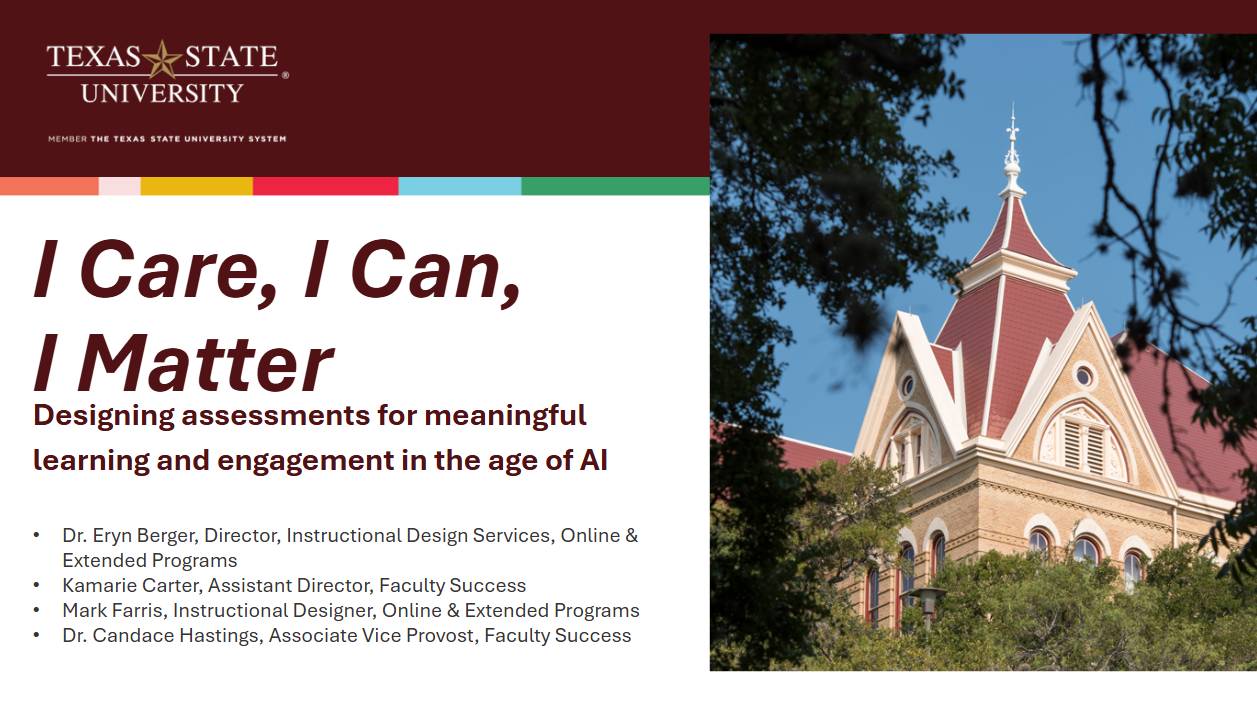
IN THE NEWS: New AI Modules Available in Canvas Commons – Help Your Students Navigate AI in Their Fields
The Center for Teaching, Learning, & Scholarship has teamed up with faculty across campus to develop 12 student-facing modules that introduce how artificial intelligence is shaping specific academic and career fields. These flexible, ready-to-use (“plug-and-play”) modules are designed to help students build awareness of AI’s role in their discipline, what they need to know now, and how they can begin engaging with AI responsibly and effectively.
Download an accessible PDF version of the Canvas AI Modules Overview
Now available in Canvas Commons:

Frequently Asked Questions About AI
-
How can learning about AI benefit me?
Engaging with these technologies firsthand allows you to:
- Gain Practical Experience: Hands-on practice helps you understand the functionalities, limitations, and potential applications of AI in educational and workplace contexts.
- Enhance Teaching Methods: By experimenting with AI tools, you can discover new ways to enhance student engagement, streamline administrative tasks, and personalize learning experiences.
- Stay Current with Technological Advances: Regular interaction with AI platforms ensures that you remain up to date with the latest developments in AI, preparing you to effectively incorporate these innovations into your curriculum.
-
What are some advantages to using AI?
- Administrative efficiency: AI can automate repetitive tasks like scheduling, grading, and data analysis, freeing up more time for teaching and research.
- Student engagement and personalization: AI can tailor educational content and interventions to individual learning styles and needs, enhancing the learning experience and outcomes.
- Accessibility: AI offers the potential to create more inclusive learning environments by providing tools for students with disabilities, such as text-to-speech or speech-to-text technologies, and by adapting content to diverse learning preferences and abilities. However, there are also accessibility challenges with AI that include performance inconsistencies that affect access.
-
What are some limitations to using AI?
- Data and Privacy: AI poses a concern regarding data and privacy issues because of the security and ethical implications of storing and analyzing large amounts of sensitive student and institutional data.
- Potential for Data Bias: There is a concern with AI regarding biased algorithms that generate unfair outcomes and perpetuate inequalities, posing challenges to creating equitable learning environments.
- Lack of Connection: The lack of human "touch" is a concern among those who value the interpersonal connection and nuanced understanding that human instructors bring to the learning process, and there is worry that over-reliance on AI may diminish the quality of education and student support due to a lack of human connection.
-
How can I learn about new AI tools?
AI Tools Directory and Futurepedia are AI directory websites that compile a list of known AI tools, models, and technologies.
-
How can I detect AI used by my students?
AI detection tools, while useful, are not always reliable for evaluating student work in higher education. These tools can often produce false positives and false negatives, potentially misidentifying original work as plagiarized or missing actual instances of academic dishonesty. Additionally, they may struggle with nuanced writing, creative expression, and discipline-specific terminology. If you decide to use detection tools in your class, it is recommended that you use them as a supplement to, rather than a replacement for, your professional judgment and understanding of your students' work.
Some commonly used AI platforms for faculty are Trinka.ai, GPTZero, Scribbr, Writer AI, and Turnitin. The Center for Teaching, Learning, and Scholarship cannot confirm the validity and accuracy of these platforms.
-
What are some ethical considerations of AI?
-
Accessibility and Disability
Understanding the accessibility implications of AI is crucial for creating an inclusive learning environment. Faculty should consider the following aspects:
- Inclusive Design: AI tools should be designed to be accessible to all students, including those with disabilities. This includes ensuring compatibility with assistive technologies and adhering to web accessibility standards. The Division of Information Technology (DOIT) at Texas State offers information and training on accessibility standards and best practices through their website.
- Reducing Barriers: AI can help reduce learning barriers by providing personalized support, such as speech-to-text for students with hearing impairments or text-to-speech for those with visual impairments.
- Continuous Evaluation: Faculty should regularly assess the accessibility of AI tools and make necessary adjustments based on feedback from students and advancements in accessibility standards.
-
Privacy and Data
It's important to handle personal information with caution.
- Data and Privacy Policies for: Microsoft (Teams) and Zoom
- Open sourced AI will use data to train its program, so be mindful of the information you are entering and ensure that you are abiding by FERPA policies.
-
Environmental Impact
There is concern with AI and its environmental impact, as the energy-intensive computations involved in training large models contribute to significant carbon emissions and resource consumption.
-
Copyright Infringement
Currently, there is concern—and a legal battle—with AI and potential copyright infringement issues arising from the unauthorized use of copyrighted materials in the training datasets. All users, including students, should be aware of policies regarding training datasets for AI platforms.
-
Faculty Transparency
The use of AI in education presents several considerations regarding students' rights. Accessibility, data privacy, copyright infringement, and intellectual property are all considerations to keep in mind when faculty members submit student work to an AI platform for purposes such as grading or review.
Students are also increasingly concerned about the transparency of faculty AI use in course materials and assignment feedback.
Faculty members should consider notifying students when AI platforms will be used to provide course materials and evaluate student work. Engaging in open dialogue about informed consent regarding the use of these tools is highly encouraged.
-
-
How can I prepare to use AI for research?
-
Consider the Limitations
AI tools are robust and continually evolving, expanding, and improving every day. However, there are still many limitations and gaps in AI tools that must be understood and carefully considered when utilizing such platforms.
- Firstly, AI systems can perpetuate existing biases present in the data they are trained on, leading to skewed and inaccurate results.
- Secondly, the ambiguity of many AI algorithms, often referred to as the "black box" problem, can make it difficult to understand how AI conclusions are drawn, raising concerns about transparency and accountability.
- Another concern is the reliance on AI that may result in overconfidence in the technology, potentially overlooking errors or anomalies that human oversight could catch.
- There are also ethical considerations, such as ensuring the privacy and security of sensitive data—especially involving human research participants and AI.
- Lastly, the rapid pace of AI advancements requires researchers to stay continuously updated on best practices and emerging issues, demanding a significant investment of time and resources.
-
Disclose Proactively
Inform your IRB when you use AI in your research to interact with or obtain data by or from human research participants.
When using AI in or to assist with any portion of a paper or article for journal submissions, check author guidelines and their permitted uses and restrictions of AI.
-
AI in Teaching and Learning: Resource Hub
Articles on Teaching with AI
- "Teachers assign us work that relies on rote memorization, then tell us not to use artificial intelligence"
- 10 Best Practices for AI Assignments in Higher Ed
- Educause AI Community Group
- How professors can reap the benefits and avoid the pitfalls of ChatGPT
- Students as Conscientious Objectors to Generative AI
- Teaching Tip: Navigating AI in the Classroom
AI in Education
- AI and Education Report from MIT
- AI in Education, Career Readiness, and Lifelong Learning [Free Ebook] by Dr. Autumn B. Guel, Senior Lecturer at Texas State University
- AI in Education: New Guidance from the Department of Education
- AI in Higher Education Global Survey 2026
- eSchool News, “What are the Benefits and Risks of Artificial Intelligence in Education?”
- Walden University, “5 Pros and Cons of AI in the Education Sector”
AI in Research
- How AI is Transforming Research: More Papers, Less Quality, and a Strained Review System
- How Generative AI Tools Help Transform Academic Research
- The Potential and Concerns of Using AI in Scientific Research: ChatGPT Performance Evaluation.
- Scientific Production in the Era of Large Language Models
- UNESCO: Guidence for Generative AI in Education and Research [Updated 2026]
- Using artificial intelligence in academic writing and research: An essential productivity tool.
- Will AI Replace Literature Reviews? History May Tell
AI Detection
- AI Detection Pushed My Students to Use AI
- AI Detectors Are Out, New Assessments Are In
- AI: Lessons Learned from a Graduate-Level Final Exam
- Don’t use AI detectors for anything important
- The US Constitution was flagged as AI-written by AI-detector. Why?
- We tested a new ChatGPT-detector for teachers. It flagged an innocent student.
University Resources
- AI TXST Tools (Supported by IT)
- Applied Intelligence: Working with AI Canvas Course (For all faculty, staff, and students)
- Avoiding and Recognizing Plagiarism
- Center for Data and Analytics Science (CADS)
- The Ethics of Artificial Intelligence from McCoy College of Business
- Getting Started with AI Canvas Course (For all faculty, staff, and students)
- The Honor Code Council
- IT AI Hub
- Plagiarism, AI & ChatGPT: Writing, Citations, & Plagiarism
- TXST Guidelines for the use of Artificial Intelligence (AI) Tools
- TXST Library AI Guide: Tools for Literature Reviews
- TXST Library Guide